Help Center
Everything you need to know to get the most out of Sphere. Learn how to create invoices, collect payments online, connect your bank with Plaid, generate financial reports, and leverage our AI copilot.
Quick Navigation
Create Invoices
Collect Payments
Connect Your Bank & Credit Cards
Financial Reports
AI Copilot
Create Professional Invoices
Generate and send branded invoices to your clients in minutes
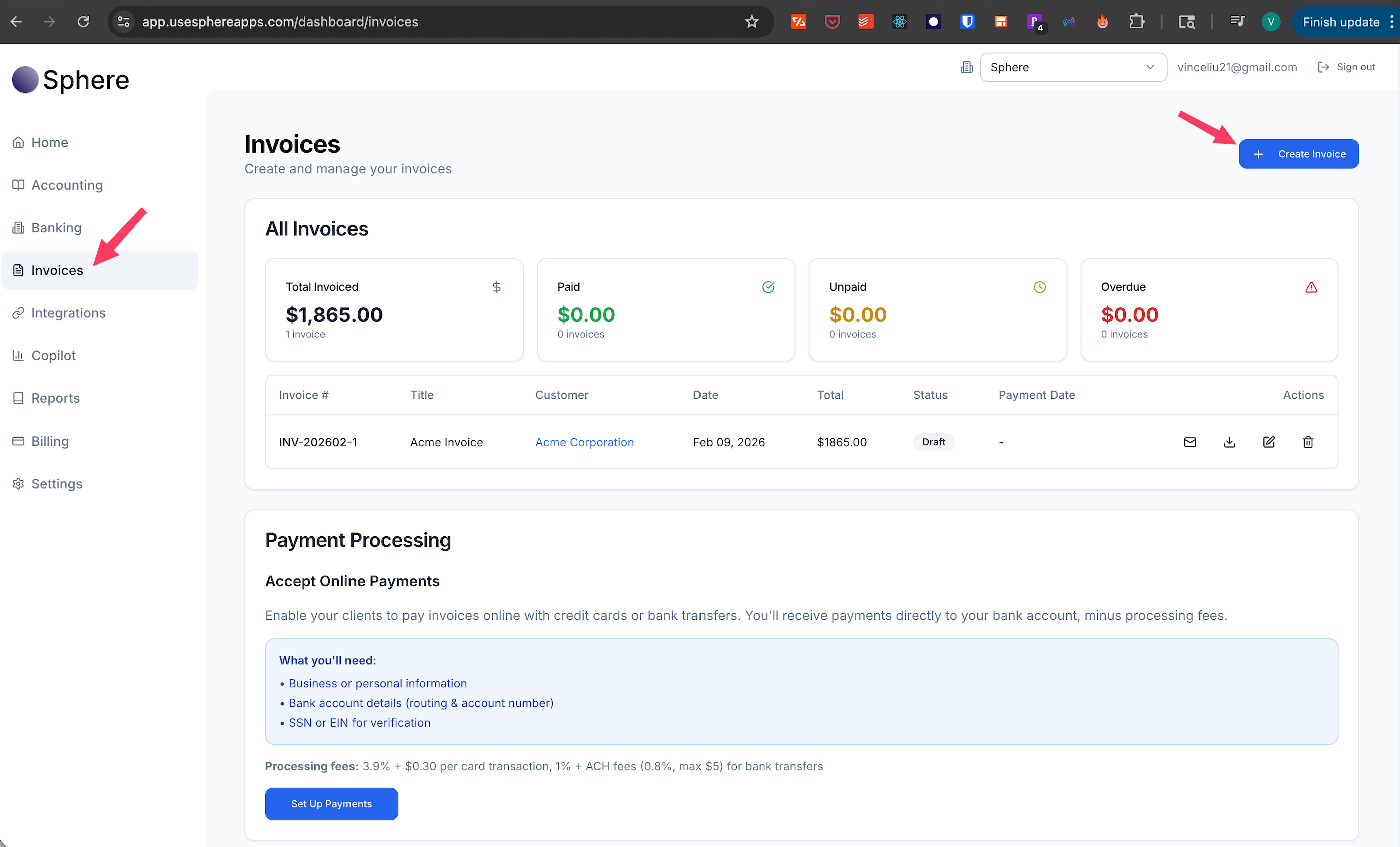
How to Create an Invoice
Follow these simple steps to create and send your first invoice
Navigate to Invoices
From anywhere in the Sphere app, click on "Invoices" in the main left navigation menu.
Click "Create Invoice"
Start creating your invoice by clicking the "Create Invoice" button in the top right.
Add Line Items
Add your services or products with descriptions, quantities, and prices.
Customize with Your Logo
Add your company logo directly on the invoice creation form to make your invoices look professional and branded.
Review and Send
Preview your invoice, then send it directly to your client via email or download as a PDF.
Collect Payments Online
Get paid faster by allowing clients to pay invoices online with credit card or ACH
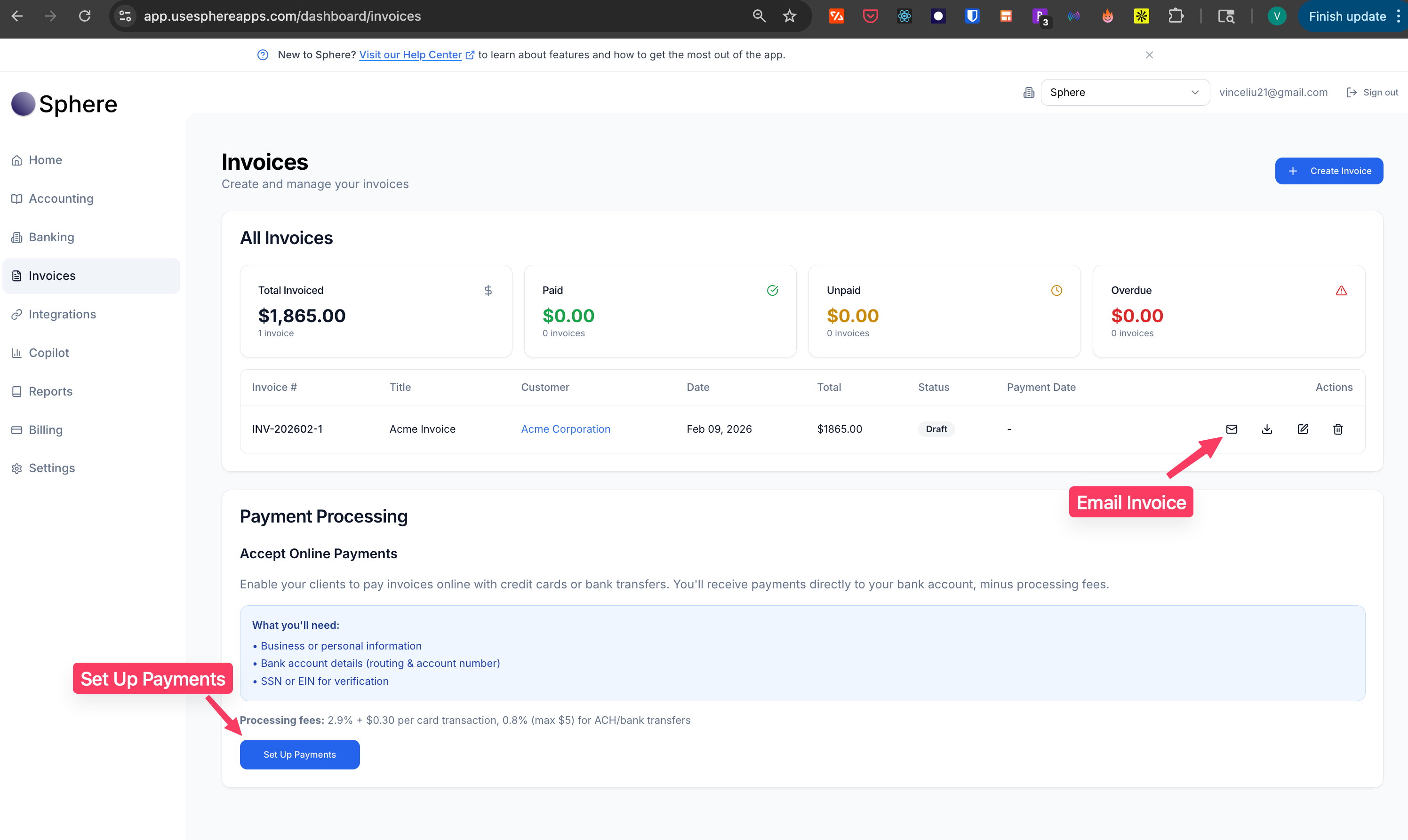
How to Enable Payment Collection
We use Stripe to accept payments on your invoices in minutes to facilitate the most secure and reliable transaction.
Navigate to Invoices
From anywhere in the Sphere app, go to the Invoices page.
Click "Set Up Payments"
Click the "Set Up Payments" button at the bottom of the page in the Payment Processing Card.
Complete Stripe Connect Setup
The Stripe Connect UI will open. Enter your business information or personal information (as a individual/sole proprietor), banking details, and verify your identity.
Set Up Accounting
In the Sphere app, specify a "Deposit to Account" and "Payment Processing Fees Account" for proper tracking in your books.
Start Accepting Payments
Within minutes, you can email invoices with the payment link toggle enabled, allowing clients to pay online instantly!
Payment Processing Fees
- Credit Card: 2.9% + $0.30 per transaction
- ACH/Bank Transfer: 0.8% (max $20 per transaction)
Competitive Rates
These payment processing fees are industry-leading rates, especially the ACH option which offers significant savings on larger transactions.
Connect Your Bank & Credit Card Accounts
Securely link your bank and credit card accounts with Plaid for automatic transaction syncing
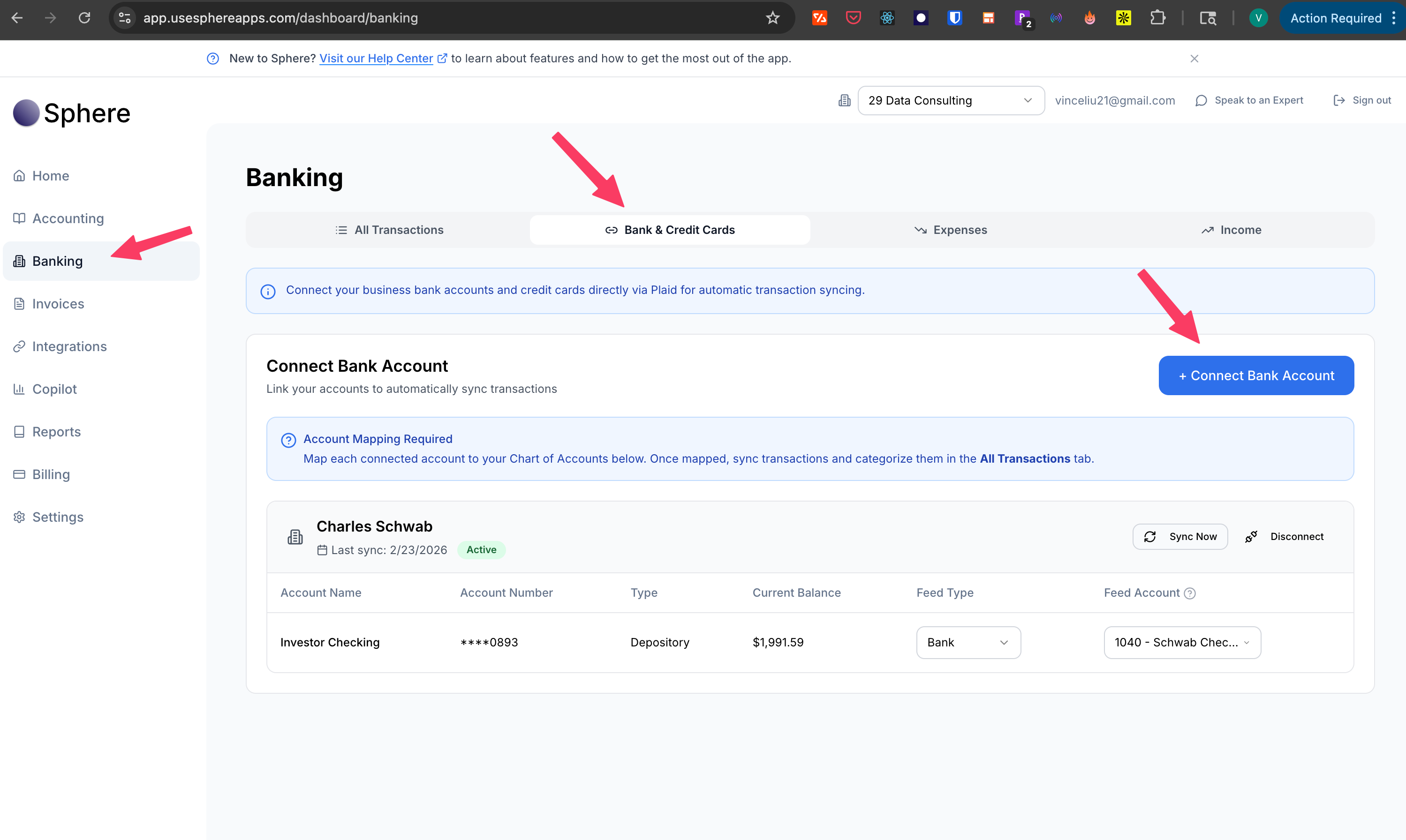
How to Link Your Bank / Credit Card
Connect your account safely using Plaid integration
Go to Banking
From anywhere in the Sphere app, navigate to the "Banking" section in the left navigation menu.
Click the "Bank & Credit Cards" tab
This will take you to the page where you can both see all your connected bank/credit card accounts and connect new ones.
Click "Connect Bank Account"
This will launch the secure Plaid connection interface.
Search for Your Bank
Type in your bank's name and select it from the list. Plaid supports over 12,000 financial institutions.
Enter Your Credentials
Provide your online banking username and password. This is done securely through Plaid's encrypted system.
Select Accounts
Choose which accounts you want to connect to Sphere, then confirm the connection.
Security Note
Plaid uses bank-level encryption to protect your credentials. Sphere never stores your banking passwords.
Generate Financial Reports
Access P&L statements, balance sheets, and more with one click
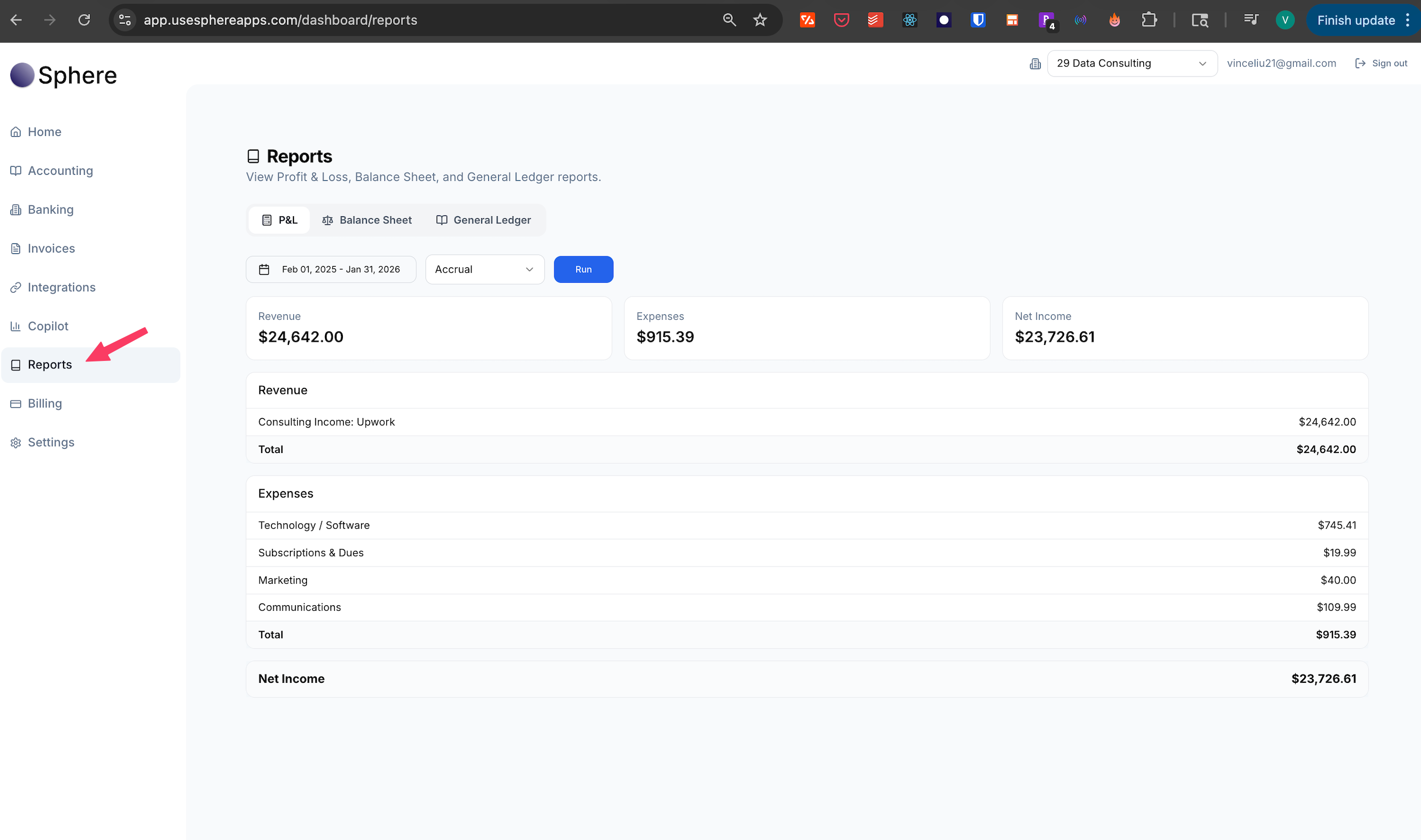
How to Generate Reports
Get instant insights into your business finances
Navigate to Reports
From anywhere in the Sphere app, navigate to the "Reports" section in the left navigation menu.
Choose Your Report Type
Select from Profit & Loss Statement, Balance Sheet, or General Ledger reports.
Set Your Filter Conditions
Select from any of the available filter conditions for the report to narrow down your report.
Available Reports
- Profit & Loss (P&L): Track revenue, expenses, and net income
- Balance Sheet: View assets, liabilities, and equity
AI Copilot Assistant
Get instant answers to your accounting questions, anytime
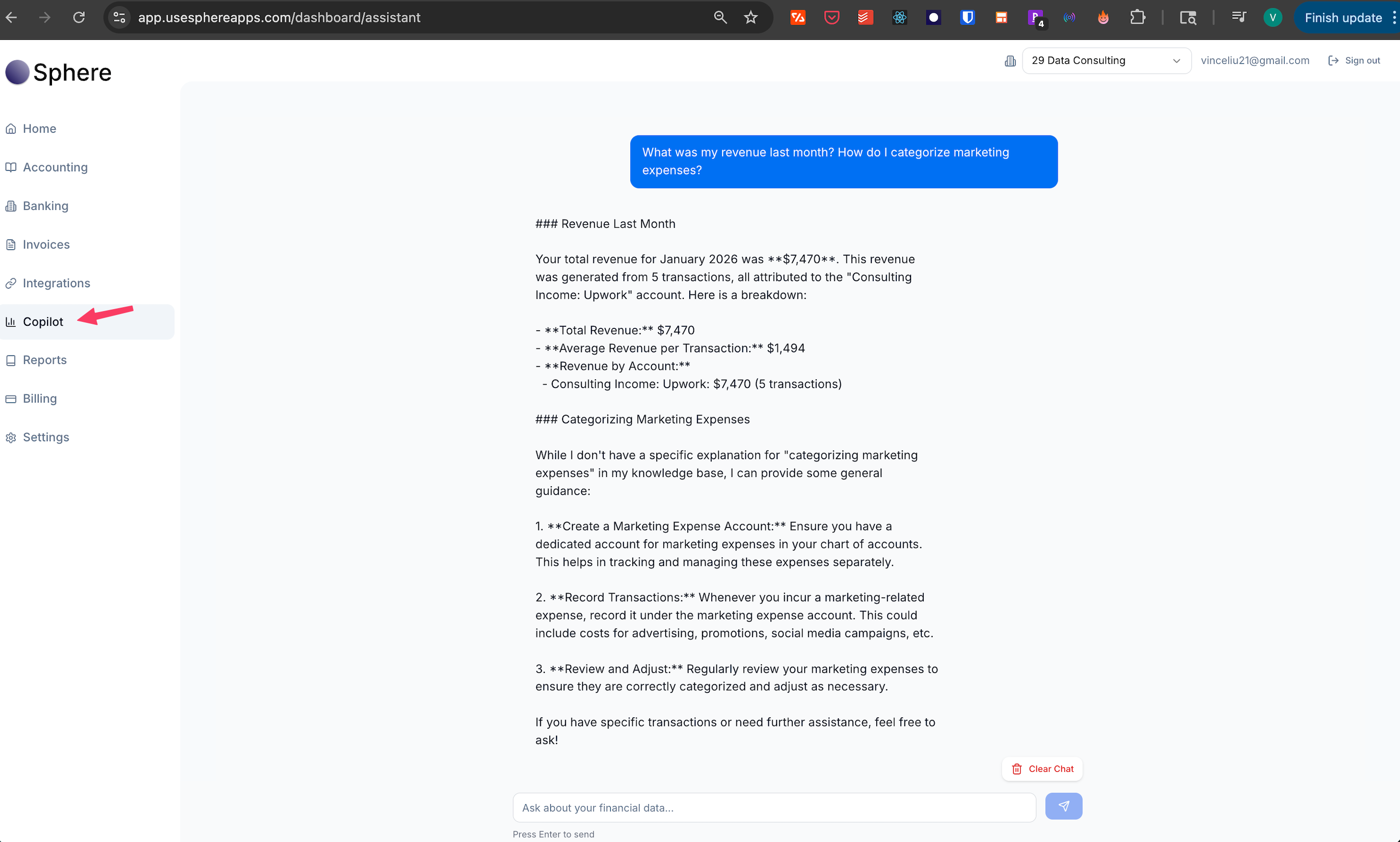
How to Use the AI Copilot
Your personal accounting/financial assistant, powered by AI
Open the Copilot
From anywhere in the Sphere app, navigate to the "Copilot" section in the left navigation menu.
Ask Your Question
Type any accounting, financial, business, or any type of question in plain English. The AI understands natural language.
Get Instant Answers
The Copilot will analyze your question and provide relevant answers based on your business data and accounting best practices.
Follow Up
Ask follow-up questions to dig deeper. The Copilot remembers your conversation context.
Example Questions to Ask
- "What was my revenue last month?"
- "How do I categorize marketing expenses?"
- "Show me my top expenses this quarter"
- "What deductions am I eligible for?"
- "Help me understand my cash flow"

Ready to streamline your finances?
Book a demo call or sign up for a free account today.